

What Gigasheet looks like
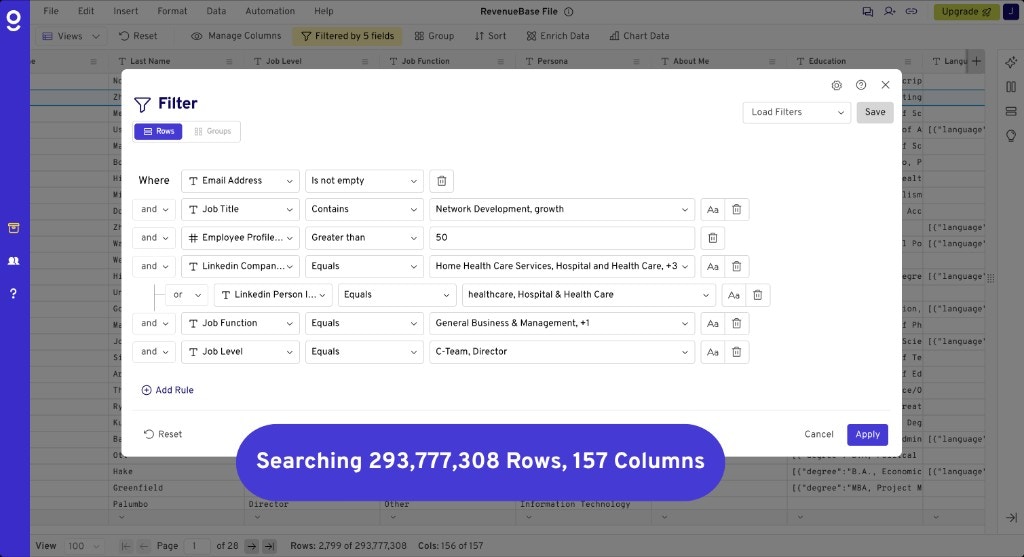
How the data is structured
Gigasheet exposes RevenueBase data in pre-joined tables so you can work without writing SQL or joining rows yourself.What you can do
- Search — Find people and organizations by name, domain, industry, and other attributes.
- Filter — Narrow results with filters on verification status, seniority, company size, and more.
- Export data — Download filtered results as CSV or use them in downstream tools.
- Enrich your data with RevenueBase data — Enrich your own lists using RevenueBase data inside Gigasheet.
Core features
- Filtering - Build targeted lists with 150+ filters.
- Grouping & aggregation - Roll up people to company level for account prioritization.
- Saved views - Save and reuse filter logic; views update monthly.
- Sharing data - Share sheets and views with your team.
- Exporting data - Download filtered results as CSV or export to HubSpot.
- Enrich your data - Enrich your lists with RevenueBase contact and company data.