

Subscriptions: Gigasheet is a flat subscription with unmetered access. The RevenueBase data feeds you use inside Gigasheet (e.g. people + company, enhanced) are separate subscriptions. You can subscribe to Gigasheet and add data feeds, or add Gigasheet to your existing data feed subscription. Contact your account manager for pricing (you can also contact support@revenuebase.ai).
Data delivery options
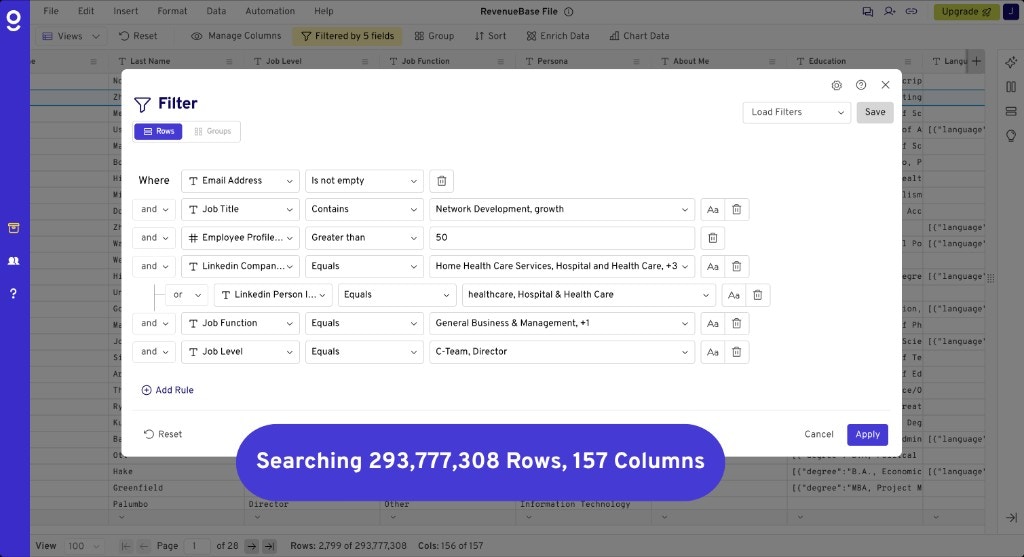
Included in the cost of your Base or Enhanced subscription is access to one RevenueBase delivery method, one of which is Gigasheet. Users can also receive raw data feeds via S3 or Snowflake instead of the Gigasheet UI — or can have access to both the UI and a raw data feed for an additional cost. Contact your RevenueBase Account Manager for additional pricing and to configure your desired delivery method(s) (you can also contact support@revenuebase.ai).What Gigasheet looks like
How the data is structured
Gigasheet exposes RevenueBase data in pre-joined tables so you can work without writing SQL or joining rows yourself.- People + company — One table contains all people in the database with company information already joined. You see contact and company fields side by side in a single sheet.
- Enhanced package — In the enhanced package, the table includes people, company, and insights joined together. Everything is pre-joined: you get contacts, firmographics, and insight data in one place with no joins required.
What you can do
- Search — Find contacts and companies by name, domain, industry, and other attributes.
- Filter — Narrow results with filters on verification status, seniority, company size, and more.
- Export CSVs — Download filtered results as CSV or use them in downstream tools.
- Export to HubSpot — Send selected rows directly to HubSpot. See Exporting to HubSpot for steps.
- Enrich your data with RevenueBase data — Enrich your own lists using RevenueBase data inside Gigasheet.
Getting started
Quickstart
Connect and open your first sheet in a few steps.
Setup & access
Accessing your data
Log in and find your RevenueBase file in Shared with me.
Add users
Add team members via support@gigasheet.com.
Search, filter & views
Filtering
Build targeted lists with 150+ filters.
Saved views
Save and reuse filter logic; views update monthly.
Grouping & aggregation
Roll up people to company level for account prioritization.
Saving views
Save a view for later.
Sharing data
Share sheets and views with your team.
Export & enrichment
Exporting CSVs
Download filtered results as CSV.
Exporting to HubSpot
Push data from Gigasheet into HubSpot.
Enrich your data
Enrich your lists with RevenueBase contact and company data.