> ## Documentation Index
> Fetch the complete documentation index at: https://docs.revenuebase.ai/llms.txt
> Use this file to discover all available pages before exploring further.
# Saved Views
> Create, share, and manage saved views in Gigasheet
Save filter and grouping logic as views so you can return to the same segment later without reapplying steps.
## Creating and managing saved views
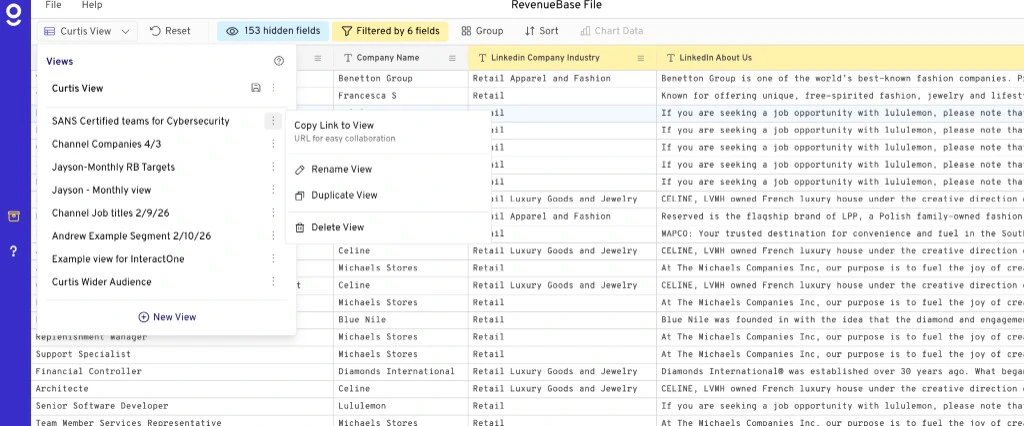
When you create a filter you want to save and return to later, click **View** and then **Add New View**.
Saved views are **dynamic** — they automatically update every month when the database is refreshed with new data. Any time you click into your view, it will reflect all the filters and logic you added, including any group functions or columns you configured.
## How to save a view
1. Open your RevenueBase sheet in Gigasheet (people + company or enhanced view).
2. Use the search bar and [Filter](/docs/gigasheet/advanced-usage/search-filter-views/filtering) to narrow to the contacts or companies you want.
3. Save the current view (e.g. **Save view**, **Save as view**, or your organization’s equivalent in Gigasheet).
4. Name the view so you can find it later. You can return to it anytime without reapplying filters.
Saved views are useful for recurring segments, reporting, or quick access to the same slice of data for [Exporting CSVs](/docs/gigasheet/advanced-usage/export-enrichment/exporting), [Exporting to HubSpot](/docs/gigasheet/advanced-usage/export-enrichment/exporting-hubspot), or [enriching your data with RevenueBase data](/docs/gigasheet/advanced-usage/export-enrichment/enrichment).
### Video walkthrough
## Sharing & managing views
* You can share views with other Gigasheet users on your team.
* To duplicate, update, or manage a view, use the **three-dot menu (⋯)** next to the view name.